Showing posts with label Smart Phones. Show all posts

Cicret Bracelet, How it works. ?

Cicret bracelet specs, features and working. Must read before buy


Cicret Bracelet


Developers : Cicret, inc

Cicret Bracelet's short description is " Your skin is your new touch screen ". It is one of the new Technology on earth. It has many features you can see more details on official website of cicret. Next Level Tech in this post will discuss the features and work of cicret bracelet

Must read the following lines before buying.


Working


Cicret Bracelet is a Bracelet that fixes on hand same as the normal bracelet.The question is how this bracelet acts as a smartphone. ? Answer is it is not a smart phone. How this works.? it just displays your smart phone screen on your hand using blue tooth.


Benefits


If your phone is away from you and you are doing some imp work like reading and your phone is ringing, you can attend your phone with this bracelet. One of the most imp benefit of this bracelet is, it works in water, If you are taking bath in tub. It is water resist


Specifications


It includes following major specs

1. Snap Button
2. LED
3. Blue tooth
4. WiFi
5. Battery
6. Memory Card + Rom
7. Processor
8. Pico Projector
9. Micro USB
10. Vibrator

iPhone 7, Reviews


iPhone 7, Reviews, Specs, Feature and many details about its Pricing etc.


iPhone 7


Developers: Apple, inc

iPhone 7 is the latest phone for I Phone versions. You will be aware of old versions i.e iPhone 6, 5, 4, But the new iPhone 7 has a lot of new features. this post will discuss the features and specs of this new Apple iPhone 7. Must subscribe by your email to stay updated with the latest technologies and stay in touch


History


History of iPhone starts when an inventor Steve Jobs to apple, inc requested. Then this company started work for manufacturing of these iPhones. First, they invented iPhone 3g then 4, 5, 6 and now iPhone 7 the latest one. Let us discuss iPhone 7.


Specs


It has following major specifications.

1. A10 Quad core 2.5 GHz
2. 3GB Ram
3. 16MP f1.6 iSight Camera
4. IP69K Water Proofing
5. Gorilla glass 4
6. 5.0, 1080p IGZO display
7. E-ink sub display
8. 3500mAh Battery
9. Music control keys
10. iPen


More Features


More interesting features are given below.

1. A10 Fusion Chip
2. New colour options
3. New Antena Lines
4. Solid State Home Button
5. WiFi, GPS, Blue tooth and much more .......


Pricing


Its price is even higher. It is considered as the latest Phone for nowadays. Following are details of iPhone 7 Pricing

iPhone 7    32GB    649$
iPhone 7    128GB  749$
iPhone 7    256GB   849$

iPhone 7 plus     32GB  769$
iPhone 7 plus     128GB   869$
iPhone 7 plus     256GB   969

I suggest you buy iPhone 7 plus


Must subscribe, Share and comment

Also, see:

Best 5 smartphones with OLED curved displays


Android Nougat A Rich Experience to User

Android 7.0 Nougat best Features
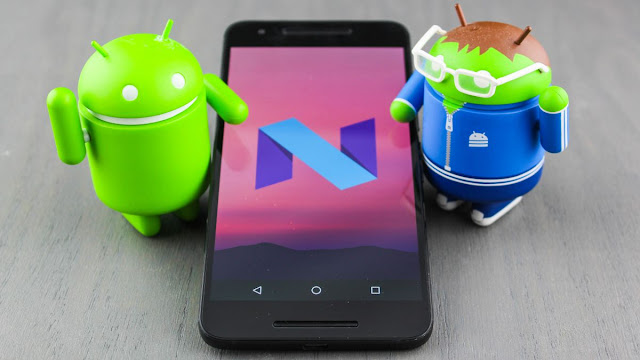


Android 7.0 Nougat features


Android 7.0  7.1.2 "Nougat is the seventh major report of the Android committed system.

Nougat introduces notable changes to the effective system and its shape ahead platform, including the completion to display fused apps as regards-screen at by now in a split-screen view, concord OpenJDK-based Java mood and Vulkan graphics rendering API, and "seamless" system updates roughly supported devices which makes it easy to complete to and more fanatic nice. 

Features


The OS that speaks your languages

Bring your words to simulation behind updated and highly adding going on emoji, and the perform to use two or more languages at the linked era.

New Emoji


Over 1500 emoji including 72 subsidiary ones. Android Nougat includes the latest and greatest Emoji certified by the powers that be, including bacon! Beyond the latest and greatest emoji baked right in to Android, you'll plus declaration Google has reworked most of the emoji included vis--vis its mobile devices. Smiley faces now have a more human see and mood to them


Multi Locale language settings


It makes it easy to switch in the midst of merged languages and input methods. This is useful if you have to write in compound scripts. You can switch the keyboards by pressing the keys re the on the order of-screen keyboard itself and without venturing into the settings all time. You can just set the sure set of languages and keyboards, and switching is just pressing a button. As an example, it means you can switch together in the middle of English, Japanese, and Mandarin from the keyboard app itself.


Multi-window view


To activate multi-window mode, long-press as regards the recent apps button. Whichever app youa propos currently using will grow the peak of the screen (not far away away and wide off from the subject of a phone, or to the left concerning a tablet), following a list of recent apps shown along the bottom.


Select the second app you sore to use from the list. Drag the divider to resize the app windows, or to maximize either of the lithe apps

Daydreams become screen savers


With Google repurposing Daydream as the namesake for its VR platform, a different make known was needed for the previous Daydream feature.


That adding taking place reveal is Screen Saver, which makes in view of that much more wisdom than Daydream did in its previous incarnation. Android screen savers yet deed in the same fashion as they always have.

Quicker multi-tasking


 You can now double-tap the recent apps button to unexpectedly switch along afterward your two most recently used apps. For example, proclaim younot far off from in Gmail but compulsion to publication something occurring in Chrome to attachment taking place in an email. You can intensification in Chrome, locate and copy a connect, with double-tap the recent apps button and your device will switch at the forefront to Gmail.


Drag and slip text, images in Multi-window mode


When using two apps at the same period, you can drag-and-slip text surrounded by the two windows. Highlight the text, later long-press a propos it until the text begins to float.


Drag it to a text auditorium in unconventional window, and permit go. The same goes for sharing images along surrounded by two apps, assuming theyve been updated for the latest of Googles wares.

Track the APK


Android Nougat will now good relatives track of where an app was installed from. Open Settings subsequently Apps and tap upon any listed application. Scroll to the bottom of the page, where youll see the source of the apps installation. For example, if it was installed from the Play Store it will broadcast as much. If it's something you side loaded, it will come clean something along the lines of "Installed from Package Installer."


Bundled notifications


Have you ever posted something upon Facebook, on your own to have your notification tray blown taking place taking into account alerts of likes and remarks? Me neither, but for those who have youon going to esteem bundled notifications.


Once an app updates for Android Nougat, it can opt to have completely share of of its notifications bundled into one nimble. Slide the length of upon the respective notification to declare the land of your alerts for that particular app.

Data Saver


When using an Android Nougat device, you can enable Data Saver to restrict specific apps from using data in the background. Under the Data Usage menu, gate Data Saver and direction it upon.


You can subsequently go through a list of apps installed upon your device, and enable background data for each one you sore spot. Otherwise, apps will only profit access to a cellular data association in the back youon the subject of actively using it.

Reply bearing in mind eagerness


You can now massive to messages from apps surrounded by Facebook Messenger, Hangouts, or Messenger directly from the notification.


Cancel button for app downloads


Ever begin to update or download apps from the Play Store, only to recall your concerning upon a cellular relationship or your battery is nearly to die? You can now end downloads directly from the download notification, on the other hand of having to tap through each item in the Play Store.


Keyboard shortcut assistant


 Using a monster keyboard taking into account a tablet furthermore the Pixel C adds a level of convenience and mobile computing attraction to the tablet. However, learning and remembering each apps keyboard shortcuts can be a chore. With Nougat, you can press Search + / to view a list of shortcuts for the app youas regards currently using.Link text

Best 5 smartphones with OLED curved displays.

Best 5 smartphones with OLED curved displays

A hot smartphone should be powerful inside and beautiful outside. Especially, a gorgeous display must be the first thing to catch our attention. Our top new smartphones with OLED curved displays start with…


Top new smart phones


1. Samsung Galaxy S8


Coming real soon this month, the Samsung Galaxy S8 display has been rated as the best ever among all. It sports a 5.8″ Super OLED curved display with a 2K resolution. The huge display comes with curves and tiny bezels. Samsung Galaxy S8 display is said to have 3D touch support and protected with Corning Gorilla Glass 5.
As for Galaxy S8 specs, the device is powered by Snapdragon 835, a 3,000mAh battery, 4GB RAM and 64GB internal storage. The Samsung S8 cameras pack a 12MP sensor on the rear and an 8MP shooter for taking selfies. Color variants include Midnight Black, Orchid Gray, Arctic Silver, Coral Blue, Maple Gold.


2. iPhone 8


Although it will not come until at least September, the iPhone 8 rumors are all over the news now. The iPhone 8 will possibly sport a 5.8-inch OLED curved display, which is protected by Ion-strengthened glass and oleophobic coating. The phone is rumored to run iOs 11 with an A11 chipset and a Quad-core CPU. iPhone 8 specs include 3GB RAM together with 3 ROM versions of 32GB, 128GB, 256GB. In terms of photography, Apple is working harder to equip its new iPhone 8 cameras with 12MP and 7MP sensors. These come with the iPhone 8 main and secondary cameras respectively.


3. Xiaomi Mi Mix 2


Xiaomi Mi Mix 2 display should be awarded as the most impressive for this year. The display comes with almost no edges or bezels, and of course no physical home button. The screen size is almost the same as the phone size. Therefore, its screen to body ratio is roughly 93%. We can expect the phone to sport a 6.4-inch shiny display. Xiaomi Mi Mix 2 specs will feature Qualcomm Snapdragon 835, 6GB or 8GB RAM, 256GB internal storage and at least a 4,400mAh battery. For photography lovers, the Xiaomi Mi Mix 2 cameras could be dual main shooters and 8MP selfie camera.


4. Samsung Galaxy Note 8


This must be the most expected phone to come after its unlucky brother Galaxy Note 7. The phone sports a 5.7-inch Super AMOLED display with a wonderful resolution of 3840 x 2160 pixels. Galaxy Note 8 specs include Snapdragon 835 or the Exynos 8895 in different regions, and a 3GHz octa-core chipset. Galaxy Note 8 will have 2 variants of 6GB RAM + 64GB ROM and 8GB RAM+ 128GB ROM. The phone surely runs Android Nougat with a battery of 3500mAh as the Note 7 or more. Samsung Galaxy Note 8 cameras will feature a 12MP main shooter and 8MP selfie snapper.


5. HTC U Ocean


The phone will come this April with a stunning OLED curved display. HTC U Ocean will sport a 5.5-inch display with a super resolution of 1440×2560 pixels. The large screen is protected with Corning Gorilla Glass 4. HTC U Ocean specs include SND 835 and Adreno 540, 4GB or 6GB RAM, and 64GB or 128GB ROM. As for HTC U Ocean cameras, the phone features a 12MP main shooter and 16MP selfie camera. The handset runs Android Nougat with a battery of at least 3,000mAh.


Best smartphones with OLED curved displays: beautiful and powerful!
Those are the great smartphones with best OLED curved displays coming this year. The good thing is that they will come with great specs and features as well. Which phone do you expect to see the most?